







or pay just ฿ 320
per month at
0% interest
Installment Details
×Choose your installment plan on the payment page during checkout!


| Bank | Interest % | Period | Monthly |
|---|---|---|---|
| Bangkok Bank Cards (BBL) | 0% | Up to 5 months | ฿ 640 |
| KBank Cards (Kasikorn Thai) | 0% | Up to 10 months | ฿ 320 |
| Krungsri Cards (BAY) | 0% | Up to 5 months | ฿ 640 |
| Krungsri First Choice Cards (KFC) | 0% | Up to 6 months | ฿ 533 |
| Krung Thai Cards (KTC) | 0% | Up to 10 months | ฿ 320 |
| SCB Cards (Siam Commercial/CardX) | 0% | Up to 6 months | ฿ 533 |
| TTB Cards | 0% | Up to 10 months | ฿ 320 |
Refund policy for digital products
Please note that virtual products are non-refundable
Payment & installments
Orders from 3000 THB are eligible for payment in up to 10 installments.
Installments are currently only supported for customers that use a Thai-issued creditcard from select Thai banks.
You can select your preferred installment option during your payment.

PSPaudioware developed auralControl to address the growing complexity of immersive and multichannel audio production. As formats like Dolby Atmos, Ambisonics, and surround sound become increasingly standard in film, TV, gaming, and music production, the need for real-time, intuitive control over individual speaker channels has surged. Traditional DAW tools or routing systems often lack the immediacy and flexibility required for on-the-fly adjustments during post-production or mixing sessions. auralControl fills this gap by centralizing critical monitoring functions—such as gain, delay, polarity, solo, and mute—within a streamlined interface that eliminates the need for auxiliary buses or third-party hardware. This plugin was built to simplify workflow, enhance precision, and reduce setup time in demanding multi-speaker environments.
Key Highlights
Flexible Channel Support – Manage configurations from stereo to 7.1.4 for use in immersive formats like Dolby Atmos and surround sound.
Independent Channel Gain Control – Adjust volume for each channel independently for precise speaker balancing.
Polarity Inversion – Invert phase per channel to quickly correct misalignment or test stereo/mono compatibility.
Per-Channel Delay Compensation – Time-align individual speakers or elements without re-routing or leaving your DAW.
Solo and Mute Functions – Isolate or silence specific channels to troubleshoot or focus on critical mix elements.
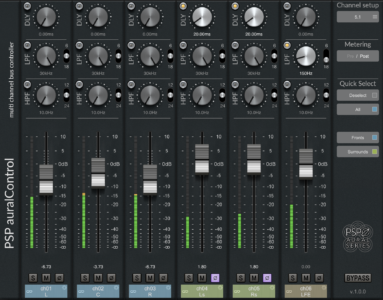
PSP auralControl (AAX for ProTools only; AU & VST3) is an essential tool for multichannel tracking, mixing and mastering. Its aim is to individually adjust level, polarity, bandwidth and timing for each individual channel in the multichannel set.
Predefined industry standard multichannel formats, grouping capability, and displaying all features on a single screen makes the PSP auralControl a time saver in a virtually every surround project. Whether dealing with imbalances in the multichannel live stem, addressing problems with a multichannel reverb track, not wanting to limit the spectrum content of the LFE or ceiling speakers, or adjusting the center channel timing and level in reference to left and right – PSP auralControl offers a straight-forward solution to these problems.
We designed this plug-in to make our friends' lives easier. Special thanks to Thor Fienberg for initial idea, inspiration and help from the beginning of the project.
Video

Features
| Re-balancing multichannel stems. |
| Monitoring of multichannel buses: you have peak meters for each channel and can mute or solo desired channels on multichannel buses – for example to check SIDEs on a multichannel reverb send. |
| Gain staging for multichannel buses: you can control the level of each channel with ease – for example bring up REARs on effect sends, reduce LFE. |
| Simple multichannel operations: you have direct access to basic HPF and LPF filters for each channel – for example to roll-off LFE with LPF or to leave only “air” on TOPs with HPF. |
| Advanced Mid-Side operations: you have access to Mid-Side processing of Stereo tracks. |
| Level control faders with Peak Meters on each channel. |
| Adjustable Delay Time, High-Pass and Low-Pass Filters. |
| Mute and Solo buttons on each channel. |
| All parameters may be controlled in Predefined or Custom Groups, or Individually for each channel in the multichannel set. |
| Advanced effect operations: you have access to a Delay section to setup unique depths for multichannel mixes – for example you can put a multi-mono instance of PSP 2445 on a multichannel reverb send, creating a type of "big monophonic reverb.” With PSP auralControl you can roll off LFE, set different frequency ranges and levels for FRONTs, REARs, SIDEs and TOPs and set different pre-delays for each channel group to produce a full-sounding multichannel reverb. |
| Advanced level riding: you have access to channel groups and record automation with relative or reversed linking (reversed linking – for example bringing up FRONT levels while reducing REAR levels). |
| Predefined industry standard multichannel formats from two-channel Left-Right or Mid-Side Stereo to 7.1.2 |
System Requirements
mac
| RAM | 0 GB |
|---|---|
| Disk | 0 GB |
| OS Version | 10.12 – 13 (Ventura) |
| Additional | The latest iLok License Manager application installed (an iLok dongle not required) |
windows
| RAM | 0 GB |
|---|---|
| Disk | 0 GB |
| OS Version | 7 – 11 |
| Additional | The latest iLok License Manager application installed (an iLok dongle not required) |
 General specifications

| Digital Download | Yes |
|---|


 Chat via LINE →
  Chat via Messenger →
Reviews
Clear filtersThere are no reviews yet.