







รายละเอียดการผ่อนชำระ
×เลือกแผนผ่อนชำระของคุณในหน้าชำระเงินเมื่อทำการสั่งซื้อ!


| ธนาคาร | ดอกเบี้ย % | ช่วงเวลา | รายเดือน |
|---|---|---|---|
| Bangkok Bank Cards (BBL) | 0% | สูงสุด 10 เดือน | ฿ 648 |
| KBank Cards (Kasikorn Thai) | 0% | สูงสุด 10 เดือน | ฿ 648 |
| Krungsri Cards (BAY) | 0% | สูงสุด 10 เดือน | ฿ 648 |
| Krungsri First Choice Cards (KFC) | 0% | สูงสุด 10 เดือน | ฿ 648 |
| Krung Thai Cards (KTC) | 0% | สูงสุด 10 เดือน | ฿ 648 |
| SCB Cards (Siam Commercial/CardX) | 0% | สูงสุด 10 เดือน | ฿ 648 |
| TTB Cards | 0% | สูงสุด 10 เดือน | ฿ 648 |
| UOB Cards | 0% | สูงสุด 10 เดือน | ฿ 648 |
สินค้าดิจิทัล/สินค้าประเภทไฟล์ดาวน์โหลดไม่สามารถขอคืนเงินได้
คำสั่งซื้อตั้งแต่ 3000 บาท มีสิทธิ์ผ่อนชำระได้สูงสุดไม่เกิน 10 เดือน
ขณะนี้รองรับการผ่อนชำระเฉพาะลูกค้าที่ใช้ บัตรเครดิตที่ออกในประเทศไทย จากธนาคารที่ร่วมรายการเท่านั้น
ลูกค้าสามารถเลือกตัวเลือกการผ่อนชำระที่คุณต้องการได้ในขั้นตอนการชำระเงิน

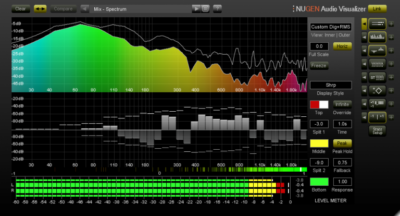
NUGEN Audio’s Visualizer was created to provide audio professionals with a comprehensive suite of tools for detailed audio analysis. It was designed to address the need for both auditory and visual feedback in mixing and mastering, helping engineers, producers, and post-production professionals identify and resolve potential issues. By offering spectrogram, waveform, stereo field monitoring, and phase correlation features, Visualizer enables precise control over frequency balance, phase coherence, and spatial dynamics. These tools help users ensure their mixes are optimized for various playback environments, delivering professional-level results. The plugin’s customizable displays, intuitive zooming, and real-time analysis offer the flexibility required for detailed, high-quality audio refinement.
Key Highlights
Measure, understand, correct
Visualizer gives you an indispensable set of audio analysis tools for quality audio production, with a standardized reference set of professional views which allow you to work faster, avoid mistakes and repeat past success.
A fully resizable, flexible interface presents all the information you need in a single plug-in window, saving time and reducing plug-in juggling complexity.
All views are highly customizable, each with an individual settings panel. Visual solo controls allow for instant inspection of any view from the click of a single button.
Single intelligent window system
Visualizer’s unique intelligent window facility lets you select multiple view combinations, automatically resizing and aligning windows to maximise legibility and cross referencing information across screens. No need to switch between plugins to get the combination of views you want. User configurable presets let you switch instantly between setups and interface sizes to build the workflow that suits you.
Comparative analysis
Comparison mode allows the direct comparison of two sources within a single Visualizer interface, utilizing overlay, side-by-side and differential views. Ideal for examining the difference before and after a mastering signal chain or for comparing spectra in preparation for EQ matching or notching out.
For music production
Visualizer’s intuitive display can be used for setting input levels, checking the phase relationship of your audio sources, and understanding the acoustics of a studio space, either by identifying problem frequencies or alerting you to unwanted noise in your signal path.
Use Visualizer to see and identify fundamental, characteristic or hidden frequencies in a recording, in order for you to EQ or even completely notch out problem frequencies. Detailed analysis of stereo placement, which can be particularly important for centering lead vocals, and for low end control.
Visualizer can be used for visual A/Bing of stereo spread and sonic fingerprinting, as well as checking phase relationships. Monitor your low frequencies and headroom, as well as examining dynamics and ensuring your project meets broadcast standards.
For post and broadcast
Clear and accurate phase analysis including overall Correlation, Correlation History, Vectorscope and Correlation by Frequency gives a highly accurate picture of your audio, allowing you to avoid potential cancellation problems and phase issues. Visualizer allows you to deliver robust, compliant audio with confidence.
Stereo and low frequency analysis ensures audio is suitable for TV broadcast by allowing you to easily monitor energy distribution and image stability.
Multiple frequency analysis views and comparison modes enable simple monitoring of stems to avoid masking dialog clarity issues.
Video

Features
| Mic-ing up and setting levels |
| Detailed analysis of the stereo field |
| Checking for phase cancellation |
| Identifying fundamental frequencies |
| Zoning in on problem frequencies |
| Examining phase relationships |
| Analysing dynamics |
| Resizable interface |
| Intelligent window optimization |
| Stand-alone and plug-in versions |
| Stereo spectrogram |
| Vectorscope |
| Stereo bias meter |
| Peak hold control |
| Correlation by frequency |
| FFT spectrum analysis |
| Frequency/dB zoom & scroll |
System Requirements
mac
| RAM | 1 GB |
|---|---|
| Disk | 0 GB |
| OS Version | Mac OSX 10.9 |
windows
| RAM | 1 GB |
|---|---|
| Disk | 0 GB |
| OS Version | Windows 7 or above |
 ข้อมูลทั่วไป

| Digital Download | Yes |
|---|


 แชทผ่าน LINE →
  แชทผ่าน Messenger →
  Chat via WhatsApp →
รีวิว
Clear filtersยังไม่มีบทวิจารณ์